
What it does and how it works
What problem does it solve?
When you produce a live event in vMix — a sports broadcast, conference, or church stream — your director and crew need to see several things at once: what time it is, how long you’ve been recording, and how much time is left on the current clip or countdown timer. This tool packages all of that into a single, clean video feed that you can pull into any screen, monitor, or downstream system — without touching your main vMix program output.
What you get
A standalone Windows application (vMixCountdownStreamer.exe) — no installation required, just double-click and run.
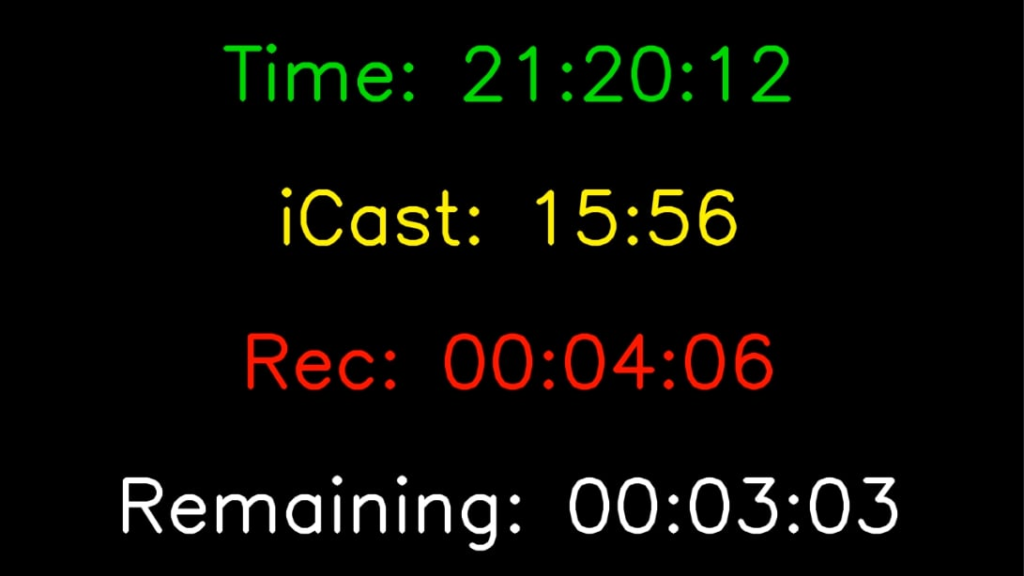
It connects to your running vMix and generates a live overlay video with up to 4 rows:
| Row | What it shows |
| Time | Current time of day (synced from vMix) |
| iCast (optional) | Live game clock from an iCast hockey scoreboard |
| Rec | How long you’ve been recording. It activates everytime you start recording (counts up). If you stop recording it will stop displaying. |
| Remaining | Time left on the active vMix input (counts down) |
Each row changes color automatically as thresholds are crossed — for example the countdown turns orange when under 10 seconds and starts flashing red under 5 seconds. The recording timer does the same when you’ve been rolling for a long time.
How you use it
- Place the exe in any folder on your Windows PC (the same machine as vMix, or another on the same network).
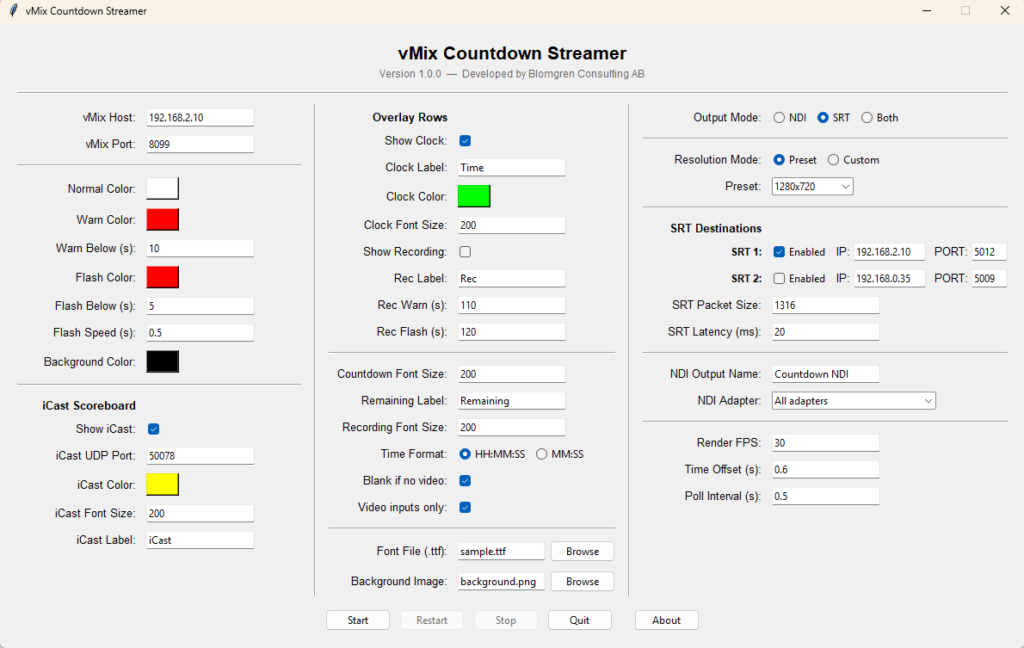
- Launch it — a settings panel opens. Enter your vMix IP address and choose your output mode.
- Start the stream — the overlay video begins broadcasting.
- Pull it in via NDI (any NDI receiver on the network sees it instantly) or SRT (push to a decoder, streaming encoder, or second machine). Up to two independent SRT destinations.
- Adjust on the fly — colors, font sizes, labels, and thresholds all update live without stopping the stream.
Key practical details
- Nothing to install — Python, FFmpeg, NDI runtime, and fonts are all bundled inside the single exe file.
- iCast Scoreboard — if you have an iCast scoreboard system, enable the iCast row and the live game clock appears automatically. It disappears on its own if the scoreboard goes offline.
- Accurate recording time — reads the actual recording duration from vMix rather than a local stopwatch, so it survives reconnects and stays in sync. Note: It can’t display an already running recording since vMix doesnt provide that.
- Two SRT outputs — send simultaneously to two destinations (e.g. a video wall controller and a replay operator) with independent enable/disable toggles.
- License — the software is machine-locked. After purchase you receive a license key that activates it on your specific PC. Start by buying the product at my shop. Then you send your Machine ID (shown in the activation dialog) to mats@blomgrenconsulting.se to get your key.
- Download — vMixCountdownStreamer
Contact: Blomgren Consulting AB — mats@blomgrenconsulting.se